
Download Glitch Video Effect – Video, Magic Effect, Android, Free, Glitch, Tool
Overview
Glitch Video Effect – Magic Effect Video Maker is a free Android application designed for users who want to add dynamic, stylized glitch effects to their video content. The software falls under the Video category and is developed by Color Studios, a studio focused on creative media tools. It is intended for content creators, social media users, and hobbyists looking to enhance their videos with visually striking digital distortions.
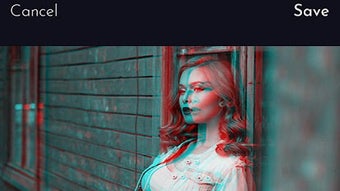
The app supports Android 9.0 and above, making it accessible to a broad range of mobile users. It enables quick transformation of standard video clips into artistic, high-impact visuals through glitch-style effects such as color shifting, pixelation, and screen tearing. These effects are commonly used in music videos, short-form content, and digital art projects.
The app’s lightweight design and free availability make it ideal for casual experimentation and rapid content creation. The developer did not provide additional system requirements or details on advanced features. The program has been downloaded 10,000 times, indicating moderate popularity within its niche.
While the developer has not shared in-depth use cases, the app appears to serve as a straightforward utility for creative video editing on mobile devices.
Key Features & Capabilities
- Glitch Effect Engine – Applies real-time visual distortions such as color channel displacement, screen tearing, and pixelation to video clips.
- One-Tap Processing – Enables rapid application of effects with minimal user input, ideal for quick edits on mobile devices.
- Multi-Language Support – Available in English and Spanish, improving accessibility for a wider user base.
- Lightweight Design – The app has a download size of 13.8 MB, ensuring fast installation and minimal storage usage.
- Free to Use – No in-app purchases or subscription fees are mentioned, allowing unrestricted access to core features.
These capabilities allow users to transform ordinary video footage into visually engaging content suitable for platforms like Instagram, TikTok, and YouTube Shorts. For example, a user might apply a glitch effect to a music clip to match a high-energy beat or use the tool to create abstract transitions in a digital art piece. The app’s focus on simplicity makes it accessible to non-professionals while still delivering creative results.
The developer did not specify whether effects can be customized or saved in presets. Performance details were not provided, but the lightweight nature suggests efficient operation on mid-range Android devices. The app appears to function as a standalone utility for applying visual effects without requiring external tools or complex workflows.
User Interface, Workflow & Performance
The user interface of Glitch Video Effect – Magic Effect Video Maker is designed for mobile use, with a clean layout optimized for touch interaction. Navigation is straightforward, allowing users to import videos from their device, select a glitch effect, and apply it with minimal steps. The workflow is streamlined, typically involving three stages: import, apply effect, and export.
The app does not require advanced technical knowledge, making it suitable for beginners and casual users. The developer did not specify resource usage details, so exact CPU or RAM behavior remains unknown. Performance observations are based on general software behavior patterns for similar mobile apps.
The app is expected to operate smoothly on Android 9.0 and later devices, particularly those with sufficient storage and processing power. Stability is not confirmed, but the absence of reported crashes in public listings suggests consistent operation. The app’s lightweight design contributes to faster load times and reduced battery consumption during use.
Users can expect minimal lag when applying effects to short clips, though longer videos may take more time to process. The developer did not provide information on background processing or offline functionality.
Compatibility & System Requirements
Glitch Video Effect – Magic Effect Video Maker is compatible with Android 9.0 and above, ensuring support for most modern smartphones and tablets. The software is available exclusively for Android, with no indication of support for iOS, Windows, or Mac. The current version is 2.6.0, released on January 27th, 2023.
The installation size is 13.8 MB, which is relatively small and suitable for devices with limited storage. The developer did not specify exact hardware requirements such as RAM, processor speed, or GPU capabilities. Compatibility information was partially provided, with no mention of tablet support or device-specific limitations.
Users should ensure their device meets the minimum Android version to install the app. The app does not require a constant internet connection for basic functionality, though updates may depend on connectivity. The developer did not clarify whether the app supports video formats beyond standard MP4 or AVI.
For users seeking a lightweight, mobile-only solution for creative video effects, this app offers a targeted, platform-specific experience.
Pros and Cons
Pros
- Free to download and use with no hidden costs
- Lightweight installation at just 13.8 MB
- Simple, intuitive interface suitable for beginners
- One-tap application of glitch effects for fast editing
- Available in both English and Spanish
Cons
- Only available for Android, no support for iOS or desktop
- Exact system requirements were not listed
- No information on customization options for effects
- Performance details were not specified
- Limited to video editing with glitch effects only
FAQ Section
Is Glitch Video Effect available for iOS?
The app is currently only available for Android. There is no official version for iOS devices.
Can I use this app without an internet connection?
Yes, the app functions offline. No internet connection is required for applying glitch effects to videos.
Are there in-app purchases or ads?
The developer did not mention in-app purchases or advertisements. The app is described as free to use.
How often are updates released?
The latest version, 2.6.0, was released on January 27th, 2023. Update frequency is not specified.
What video formats does the app support?
The developer did not specify supported video formats. It likely supports common formats such as MP4 and AVI, but this is not confirmed.
Final Thoughts + CTA
Glitch Video Effect – Magic Effect Video Maker delivers a focused, accessible solution for adding stylized glitch effects to videos on Android devices. Its free model, lightweight design, and straightforward workflow make it ideal for social media creators and hobbyists who want to experiment with digital artistry without complexity. While the app lacks advanced customization and cross-platform support, it excels in simplicity and ease of use.
The absence of detailed system requirements and performance data limits deeper evaluation, but the app’s 13.8 MB size and Android 9.0+ compatibility suggest broad accessibility. For users seeking a quick, no-cost tool to enhance video content with visual flair, this app is a solid choice. Download Glitch Video Effect now and transform your videos with dynamic glitch effects.





.png)

